

Download FoxArc Screen Capture – Free, Secure & Lightweight Screenshot Tool for Windows, Mac, Android & iOS
Effortless Screen Capture with FoxArc Screen Capture: A Fast & Reliable Solution
Looking for a simple yet powerful way to capture your screen without slowing down your device? FoxArc Screen Capture delivers exactly that—a lightweight, efficient, and user-friendly tool designed for quick screenshot capture across multiple platforms. Whether you're a student documenting research, a professional sharing reports, or a content creator capturing game moments, FoxArc makes the process seamless.
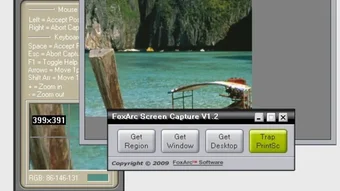
The software runs smoothly on Windows, Mac, Android, and iOS, ensuring you can take high-quality screenshots no matter your device. With minimal system resource usage, it won’t bog down your computer or drain your mobile battery. The core functionality revolves around three primary capture modes: full desktop, specific window, or custom area.
Each option is intuitive and accessible with just a few clicks. When selecting a custom area, the built-in pointer allows for pixel-perfect precision, helping you isolate only the content you need. Once captured, you can save your screenshots in multiple formats including PNG, JPG, BMP, TIF, PCX, and PNM—ideal for compatibility with different editing tools and platforms.
The tool also supports automatic file naming and customizable save locations, streamlining your workflow. What sets FoxArc apart is its focus on simplicity without sacrificing functionality. There’s no cluttered interface, no confusing menus—just a clean, straightforward experience that gets you from capture to save in seconds.
For users who value speed and reliability, FoxArc Screen Capture stands out as a go-to choice for everyday screenshot needs.
Key Features That Make FoxArc Screen Capture a Top-Tier Tool
FoxArc Screen Capture isn’t just fast—it’s packed with intelligent features that enhance usability and productivity. One of its standout attributes is the multi-format export capability. Whether you need a lossless PNG for web graphics or a compressed JPG for email attachments, the tool supports all major image formats, giving you flexibility across different use cases.
Another powerful feature is the smart capture mode selection. With just a single click, you can choose to capture the entire screen, a specific window, or a custom region. The area selection tool uses a responsive pointer that adapts to your cursor movements, allowing for accurate and efficient cropping.
Additionally, FoxArc includes auto-save and auto-naming options, which help maintain organization—especially useful when taking multiple screenshots in quick succession. The tool also supports keyboard shortcuts, enabling users to trigger captures instantly without navigating menus. For those who prefer mobile capture, the Android and iOS versions offer touch-friendly interfaces with gesture-based controls.
The software also features a built-in image preview, allowing you to review your screenshot before saving or editing. This small but valuable addition helps prevent mistakes and ensures image quality. Furthermore, FoxArc integrates seamlessly with clipboard functions, so you can paste your screenshot directly into documents, emails, or social media posts.
With no intrusive ads, no trial limitations, and no hidden fees, the free version offers full functionality. Regular updates ensure compatibility with new OS versions and security patches, keeping your tool up-to-date and secure. These features combine to make FoxArc not just a screenshot tool, but a reliable companion for daily digital tasks.
Easy Installation & Usage Across All Devices
Getting started with FoxArc Screen Capture is incredibly straightforward, regardless of your device. For Windows and Mac users, the installation process takes less than a minute. Simply download the installer from the official website, run it, and follow the on-screen prompts.
The setup is lightweight—typically under 10MB—and doesn’t require admin rights on most systems. Once installed, the app runs in the background and can be launched via a desktop shortcut or system tray icon. On Android and iOS, you can download the app directly from the Google Play Store or Apple App Store.
The mobile versions are optimized for touch, with large, responsive buttons and swipe gestures for capturing and saving. To take a screenshot, simply open the app, select your preferred mode (full screen, window, or custom area), and tap the capture button. The preview screen appears instantly, letting you confirm the image before saving.
You can then choose to edit, share, or save to your device’s gallery. The interface is consistent across platforms, so switching between devices feels natural. For advanced users, FoxArc also supports custom keyboard shortcuts on desktop versions, allowing you to assign specific keys for each capture type.
This is especially helpful for power users who take screenshots frequently. The tool also respects privacy—your screenshots are stored locally unless you choose to share them, and no data is sent to external servers. With automatic updates, you’ll always have the latest version with improved performance and bug fixes.
Whether you’re using a high-end desktop or a mid-range smartphone, FoxArc adapts seamlessly, ensuring a smooth experience every time.
Pros, Cons & Frequently Asked Questions
- Pros:
- Lightweight and fast—minimal impact on system performance
- Supports multiple formats: PNG, JPG, BMP, TIF, PCX, PNM
- Three capture modes: full screen, window, custom area
- Intuitive interface with minimal learning curve
- Free to download and use with no hidden costs
- Available on Windows, Mac, Android, and iOS
- Auto-save and auto-naming for better file organization
- Regular updates for security and compatibility
- Cons:
- Limited editing tools compared to advanced screen capture suites
- No built-in annotation or markup features
- Mobile version lacks some desktop-level customization
- Minimal documentation or tutorial videos
Frequently Asked Questions (FAQ)
- Is FoxArc Screen Capture free to use?
Yes, FoxArc Screen Capture is completely free to download and use on Windows, Mac, Android, and iOS. There are no trial limitations or hidden charges.
- Can I capture a specific window with FoxArc?
Absolutely. The tool allows you to capture any open window with a single click, making it ideal for sharing application content or documentation.
- What file formats does FoxArc support?
FoxArc supports a wide range of formats including PNG, JPG, BMP, TIF, PCX, and PNM, ensuring compatibility with most software and platforms.
- Is FoxArc secure to download?
Yes, FoxArc is distributed through official channels and is free from malware or intrusive ads. All downloads are verified for security.
- Does FoxArc work on older versions of Windows and Mac?
Yes, FoxArc is compatible with Windows 7 and later, as well as macOS 10.12 and above. It’s optimized for both modern and legacy systems.
- Can I use FoxArc on multiple devices?
Yes, you can install and use FoxArc on multiple devices across different platforms—just download the appropriate version for each.
Final Verdict: Why FoxArc Screen Capture Is Worth Your Time
If you're searching for a free, secure, and lightweight screenshot tool that works flawlessly across Windows, Mac, Android, and iOS, FoxArc Screen Capture is an excellent choice. It combines speed, simplicity, and reliability in a single package. While it may lack advanced editing or annotation features found in tools like FastStone Capture or LightShot, its core strength lies in doing one thing exceptionally well—capturing screenshots quickly and efficiently.
The minimal system impact, multi-format export, and cross-platform availability make it ideal for students, remote workers, educators, and casual users alike. Whether you're documenting a bug, sharing a tutorial, or saving a memorable moment, FoxArc delivers consistent results. With regular updates and strong privacy practices, it remains a trustworthy tool for everyday use.
For those who value efficiency and don’t want unnecessary bloat, FoxArc is a standout option. Don’t wait—download FoxArc Screen Capture today and experience the future of effortless screen capture.







